Zes apps · Één kwartaal Six apps · One quarter

Bouwen met AI
als co-piloot
Building with AI
as co-pilot

Bouwen met Claude voelde voor mij als een schilder die plotseling een nieuwe kwast krijgt. De stijl, de intentie, de smaak — die blijven van jou. Maar wat je ermee kunt doen, verruimt enorm. Building with Claude felt like a painter suddenly given a new brush. The style, the intention, the taste — those remain yours. But what you can do with it expands enormously.

Er zijn van die periodes waarin je plotseling merkt dat je in een stroomversnelling zit. Dit is het verhaal van zo'n periode: zes apps, gebouwd in amper een kwartaal, elk met een eigen aanleiding en een eigen les. There are periods when you suddenly realise you are in a rapid current. This is the story of such a period: six apps, built in barely a quarter, each with its own reason and its own lesson.

Het begon niet met een groot plan. Het begon met een probleem, een experiment, en de ontdekking dat een nieuwe manier van werken opeens binnen handbereik lag. It did not begin with a grand plan. It began with a problem, an experiment, and the discovery that a new way of working was suddenly within reach.

Ik ben van huis uit data-analist en datavisualisatie-specialist. Geen programmeur. Wat hier beschreven staat is geen portfolio van een developer — het is een eerlijk verslag van wat er mogelijk wordt als je AI als co-piloot gebruikt, zelf goed nadenkt over wat je wilt bereiken, en bereid bent om van elke stap te leren. I am a data analyst and data visualization specialist by background. Not a programmer. What is described here is not a developer's portfolio — it is an honest account of what becomes possible when you use AI as co-pilot, think carefully about what you want to achieve, and are willing to learn from every step.

De vraag waarmee het begon: The question it started with:

Kan ik met Claude iets werkends bouwen, zonder zelf te kunnen programmeren? Can I build something that works with Claude, without knowing how to code?

Taakmanager · React · Supabase Task Manager · React · Supabase

Glim

Glim taakmanager

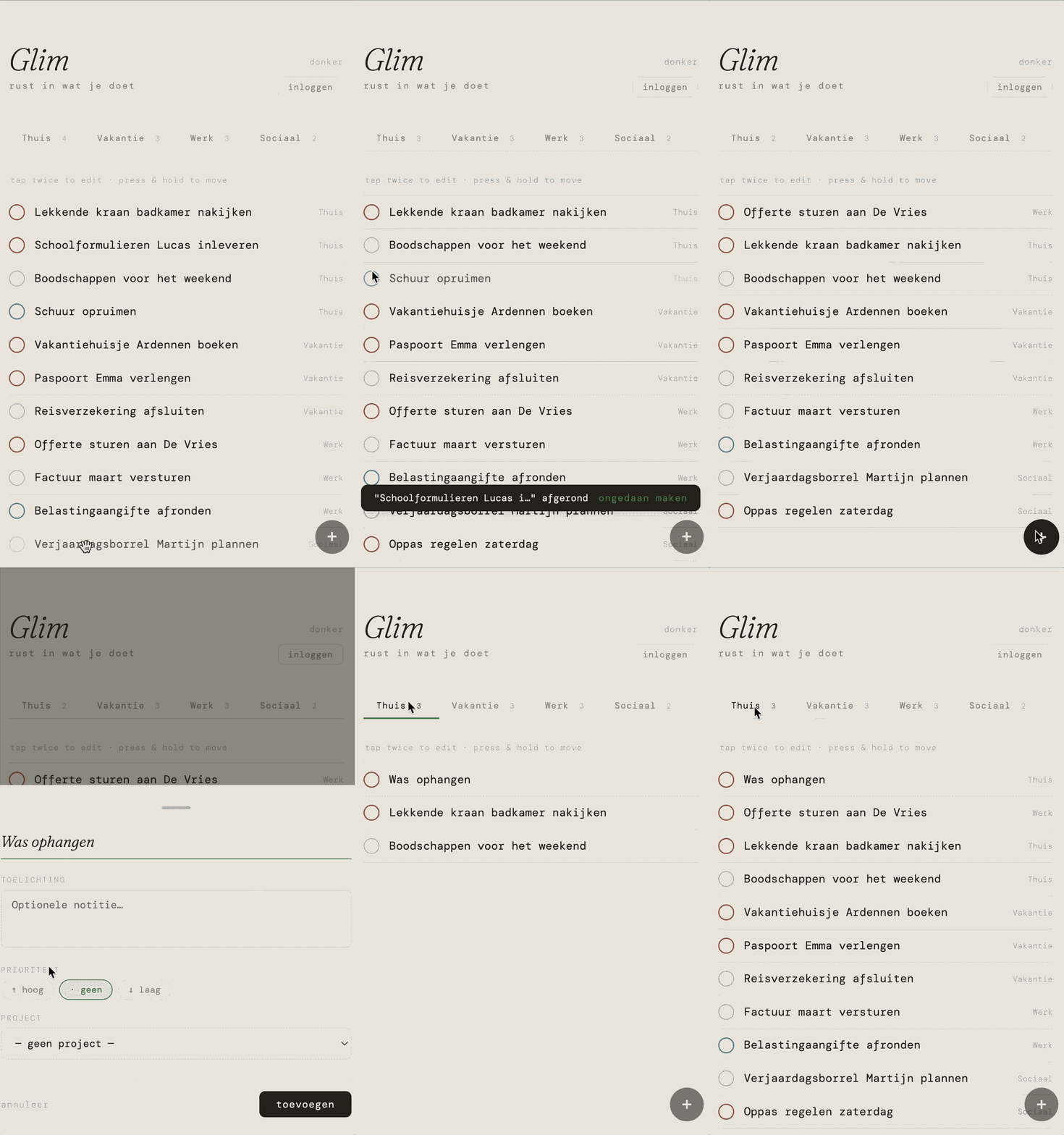
Glim was het eerste experiment. Niet alleen om een takenlijst te bouwen, maar om te ontdekken of het überhaupt kon: iets werkends maken met Claude, zonder zelf te kunnen programmeren.

Het resultaat was een persoonlijke taakmanager met één centrale gedachte: rust. Geen notificaties, geen badges, geen dashboards die je nog schuldiger doen voelen. Gewoon projecten, taken, en een visuele taal die eerder aan gebroken wit en zacht groen denkt dan aan schermtijd.

De app is mobile-first, gebouwd op Supabase als backend en uitgerust met Google-authenticatie. De interface heeft een licht- en donkermodus via CSS-tokens, een floating actieknop, prioriteitsmarkeringen, drag-and-drop met een visuele sleepschaduw, en een undo-functie.

Glim was the first experiment. Not just to build a task list, but to find out whether it was even possible: making something that works with Claude, without knowing how to code.

The result was a personal task manager with one central idea: calm. No notifications, no badges, no dashboards that make you feel even more guilty. Just projects, tasks, and a visual language that suggests broken white and soft green rather than screen time.

The app is mobile-first, built on Supabase as backend and equipped with Google authentication. The interface has light and dark modes via CSS tokens, a floating action button, priority markers, drag-and-drop with a visual shadow, and an undo function.

HTML/CSSJavaScriptSupabaseGoogle AuthCSS Tokens
Wat goed werkte What worked well

Het antwoord op de eerste vraag was: ja. Volledig werkend, met een backend, authenticatie en een verzorgde interface — in een tijdsbestek dat anders onmogelijk was geweest. Door de code achteraf te bestuderen begreep ik waarom bepaalde keuzes gemaakt waren, wat CSS-variabelen doen, en hoe Supabase werkt.

The answer to the first question was: yes. Fully working, with a backend, authentication and a polished interface — in a timeframe that would otherwise have been impossible. By studying the code afterwards I understood why certain choices were made, what CSS variables do, and how Supabase works.

Wat de volgende stap verder zou brengen What the next step would add Alles zat nog in één HTML-bestand — prima voor een prototype, maar een structuur die zijn grenzen laat zien zodra een app complexer wordt. Everything was still in a single HTML file — fine for a prototype, but a structure that shows its limits as an app grows more complex.
Bekijk projectpagina View project page
Datavisualisatie · SVG · React Data Visualization · SVG · React

The Weekly Pulse

Weekly Pulse interactieve demo

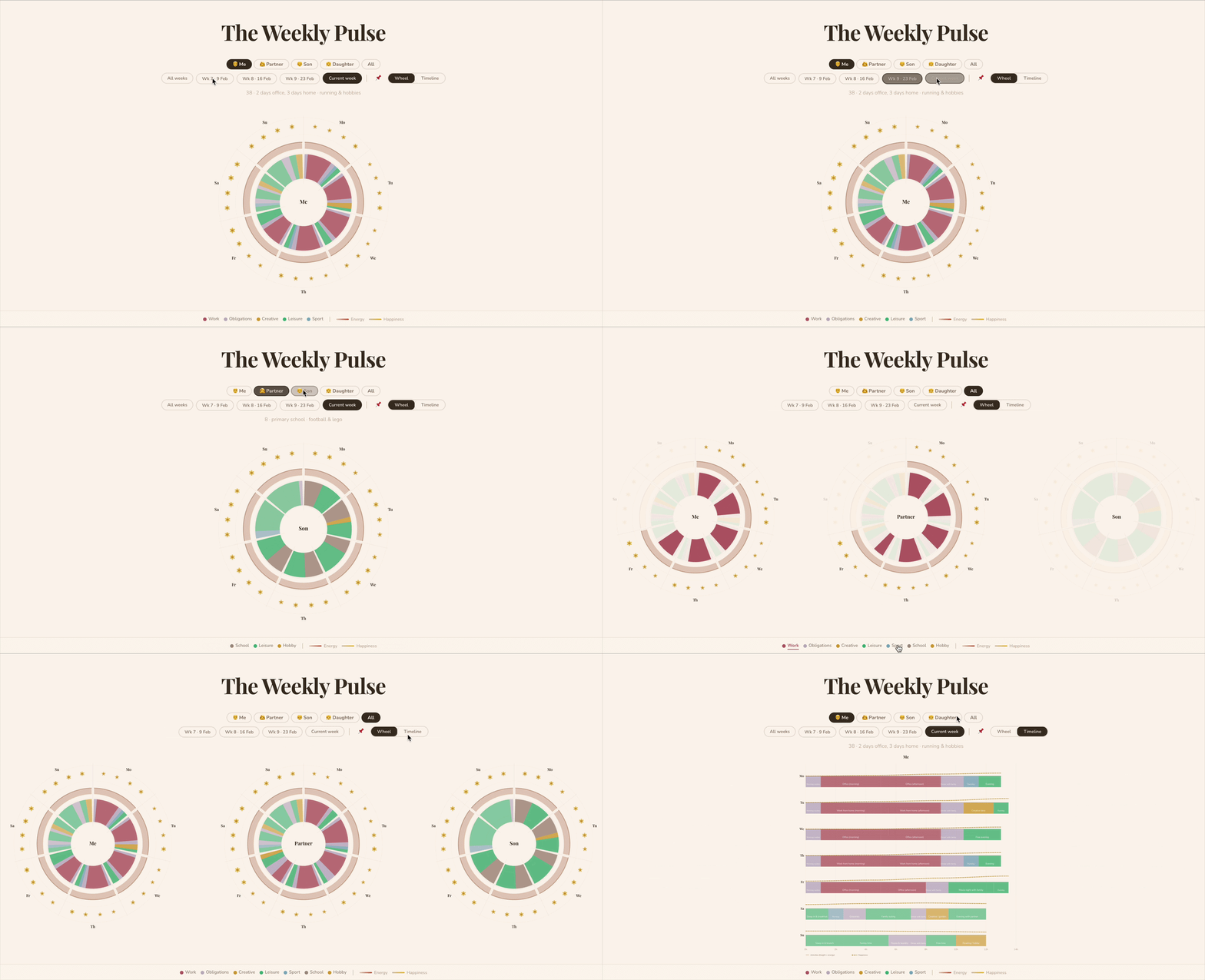
Weekly Pulse begon als een vraag: hoe ziet een week er eigenlijk uit — niet als agenda maar als patroon? Niet "wat moet ik doen om 14:00", maar "waar gaat mijn energie naartoe en wanneer ben ik gelukkig?"

Claude bouwde een interactief wiel van zeven segmenten — één per dag. Daarbinnen zijn activiteiten ingekleurd op categorie (werk, vrije tijd, sport, creatief, verplichtingen), waarbij de breedte de tijdsduur aangeeft en de hoogte het energieniveau. Een tweede weergave toont dezelfde data als horizontale tijdlijn. Beide grafieken zijn volledig in SVG, opgebouwd vanuit wiskundige functies voor boogpaden en polaire coördinaten.

Weekly Pulse started as a question: how does a week actually look — not as an agenda but as a pattern? Not "what do I have at 14:00", but "where does my energy go and when am I happy?"

Claude built an interactive wheel of seven segments — one per day. Activities are colour-coded by category (work, leisure, sport, creative, obligations), with width representing duration and height representing energy level. A second view shows the same data as a horizontal timeline. Both charts are fully SVG, built from mathematical functions for arc paths and polar coordinates.

ReactViteSVGSupabaseNetlify
Wat goed werkte What worked well

De visuele output was direct indrukwekkend. En het belangrijkste: dit was het moment waarop experimenteren overging in iets dat voelde als een eigen stem — eindelijk de interactieve webbased datavisualisaties gemaakt waar ik al jaren naar streefde. De app is inmiddels gekoppeld aan Supabase, zodat je data bewaard blijft als je ingelogd bent.

The visual output was immediately impressive. Most importantly: this was the moment when experimentation turned into something that felt like a voice of its own — finally the interactive web-based data visualizations I had been striving for. The app is now connected to Supabase, so your data is saved when you are logged in.

Bekijk projectpagina View project page
Woordenschattrainer · Spaced Repetition Vocabulary Trainer · Spaced Repetition

Lexum

Lexum woordenschattrainer

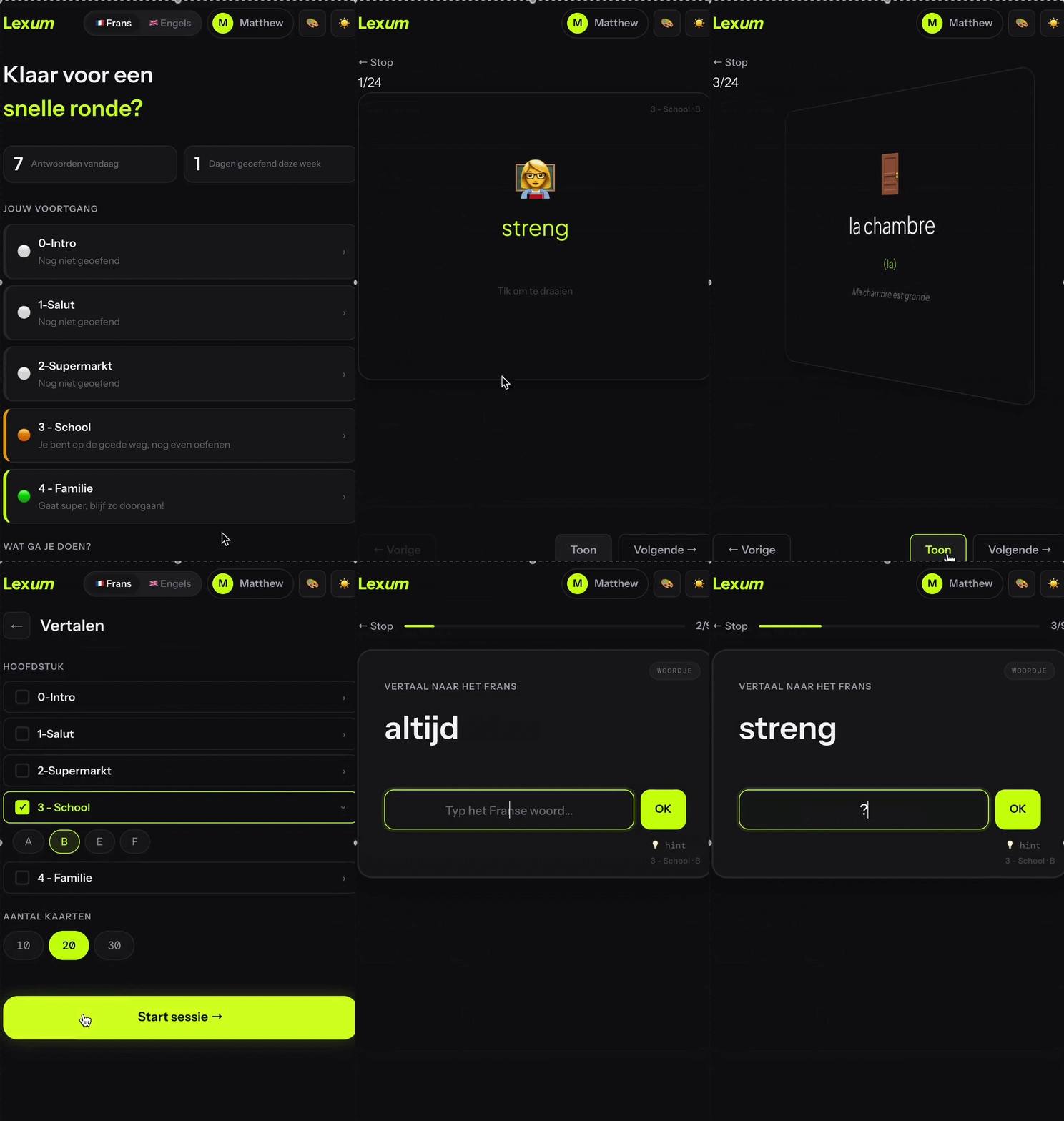
Lexum werd niet gebouwd vanuit nieuwsgierigheid, maar vanuit een concreet probleem thuis: mijn zoon moest Frans leren voor school, en de beschikbare apps sloten niet goed aan op wat hij precies moest kennen.

Lexum is een woordenschattrainer op maat met flashcards en spaced repetition — het principe waarbij je woorden vaker ziet naarmate je ze minder goed kent. De interface heeft een donkere basisstijl met electric lime als accentkleur, én een lichtmodus die met één schakelaar omgaat.

De slimste keuze zat in de backend: de woordenlijsten worden beheerd via een Google Spreadsheet. Als ouder bepaal je zelf welke woorden erin staan — geen database om te beheren, geen admin-interface om te bouwen. En om die spreadsheet te vullen stuurde ik eenvoudigweg een foto van de bladzijde uit het schoolboek naar AI. Zo werd de app niet alleen door AI gebouwd, maar ook door AI gevuld.

Na Frans is ook Engels als taalmodule toegevoegd — de Google Sheets-structuur maakt het eenvoudig om nieuwe talen in te pluggen zonder de app zelf aan te passen.

Lexum was not built out of curiosity, but from a concrete problem at home: my son needed to learn French for school, and the available apps did not match what he specifically needed to know.

Lexum is a custom vocabulary trainer with flashcards and spaced repetition — the principle where you see words more often the less well you know them. The interface has a dark base style with electric lime as accent colour, plus a light mode toggled with a single switch.

The smartest choice was the backend: word lists are managed via a Google Spreadsheet. As a parent you decide which words are in it — no database to manage, no admin interface to build. And to fill the spreadsheet, I simply sent a photo of the school book page to AI.

After French, English was added as a second language module — the Google Sheets structure makes it straightforward to plug in new languages without changing the app itself.

HTML/CSSJavaScriptGoogle Sheets APICSS Tokens
Wat goed werkte What worked well

De Google Sheets-aanpak was verrassend elegant voor een ouder die snel nieuwe woorden wil toevoegen. En de visuele taal — scherper, helderder dan Glim — paste beter bij een kind dat moet leren.

The Google Sheets approach was surprisingly elegant for a parent who wants to quickly add new words. And the visual language — sharper, clearer than Glim — suited a child who needs to learn.

Bekijk projectpagina View project page
Japan Frasengids · Next.js · OpenAI Japan Phrase Guide · Next.js · OpenAI

PhraseKit

PhraseKit Japan frasengids

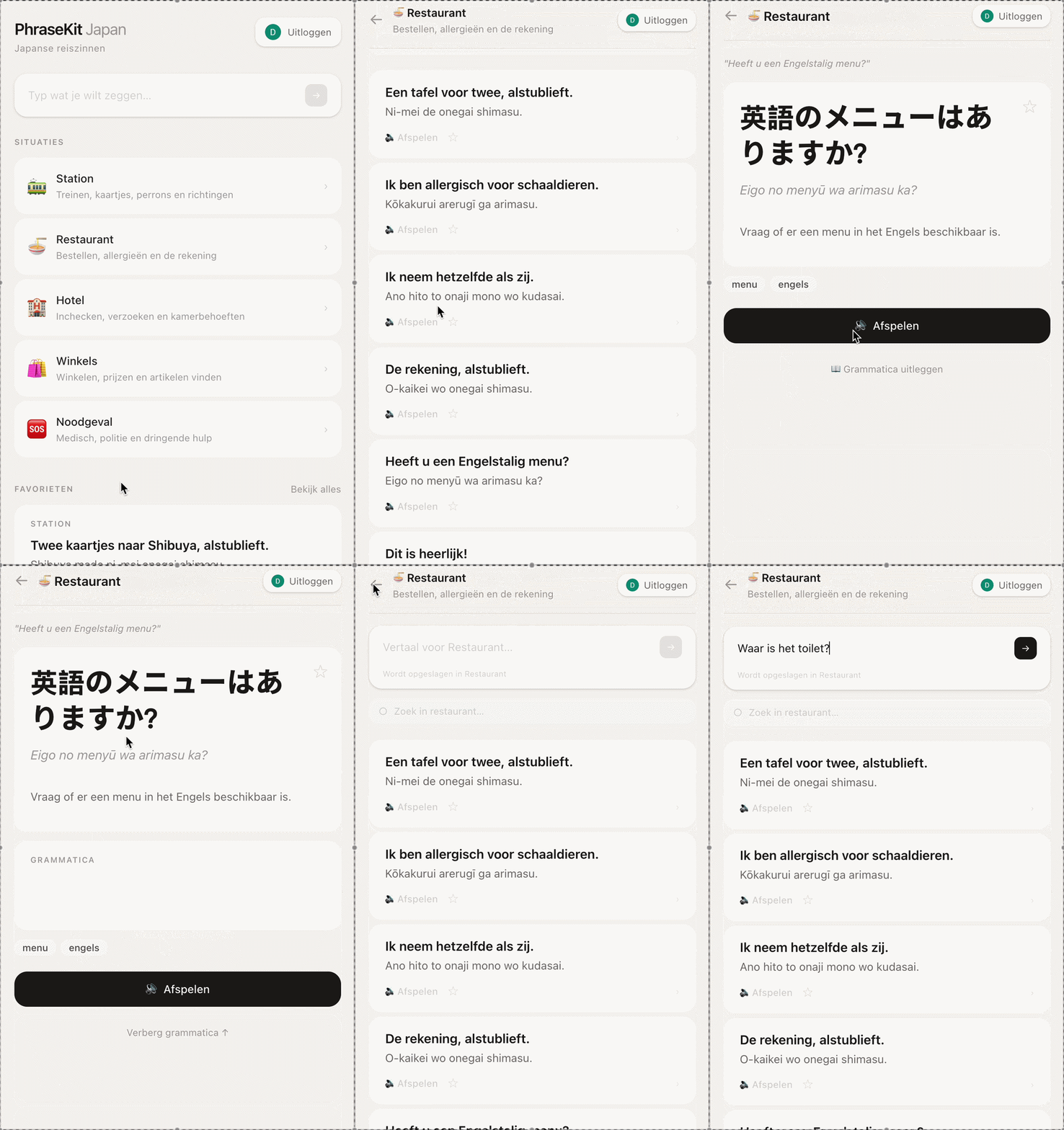
In het voorjaar van 2026 stond er een reis naar Japan op de planning. PhraseKit is de rust-in-je-broekzak-als-je-het-nodig-hebt-tool die daarvoor werd gebouwd. Niet een vertaalapparaat, niet een taalleerapp — een frasengids gesorteerd op situatie: bij de dokter, in het restaurant, op het station, in een noodsituatie.

Per frase een fonetische uitspraak in romaji, een toelichting, en een favorietenlijst voor de zinnen die jij het vaakst nodig hebt.

De "Vraag het nu"-functie is volledig live: je typt een Nederlandse zin, en OpenAI (gpt-4o-mini) vertaalt die naar natuurlijk Japans — inclusief romaji-uitspraak, uitleg, een kortere variant en een beleefder alternatief. De API draait server-side via Next.js, zodat de sleutel nooit bij de gebruiker terechtkomt.

In spring 2026, a trip to Japan was planned. PhraseKit is the peace-of-mind tool built for that. Not a translation device, not a language learning app — a phrase guide sorted by situation: at the doctor, in the restaurant, at the station, in an emergency.

Each phrase has a phonetic pronunciation in romaji, an explanation, and a favourites list for the phrases you need most.

The "Ask now" feature is fully live: you type a Dutch sentence, and OpenAI (gpt-4o-mini) translates it into natural Japanese — including romaji pronunciation, explanation, a shorter variant and a more polite alternative. The API runs server-side via Next.js, so the key never reaches the user.

Next.js 15TypeScriptTailwind CSS v4FirebaseOpenAINetlify
Wat goed werkte What worked well

Dit was de eerste app die voelde als een écht product — iets dat je op je telefoon zet en gebruikt in een stressvolle situatie. Het ontwerp is mobile-first tot in de details: grote taptargets, maximale breedte van 448px, warme kleuren die kalm aanvoelen. Audio-uitspraak via tekst-naar-spraak is inmiddels geïntegreerd, waardoor de app ook écht bruikbaar is op straat.

This was the first app that felt like a real product — something you put on your phone and use in a stressful situation. The design is mobile-first down to the details: large tap targets, maximum width of 448px, warm colours that feel calm. Audio pronunciation via text-to-speech has since been integrated, making the app truly usable on the street.

Bekijk projectpagina View project page
Reisplanning · SvelteKit · Leaflet Travel Planning · SvelteKit · Leaflet

Roamly

Roamly reisplanning

Parallel aan PhraseKit groeide een andere vraag: hoe plan je zo'n reis? Japan is groot en vraagt veel keuzes. Je wilt steden bezoeken, maar ook weten hoeveel reisdagen dat kost, hoe de volgorde logisch loopt, en waar de witte vlekken in je planning zitten.

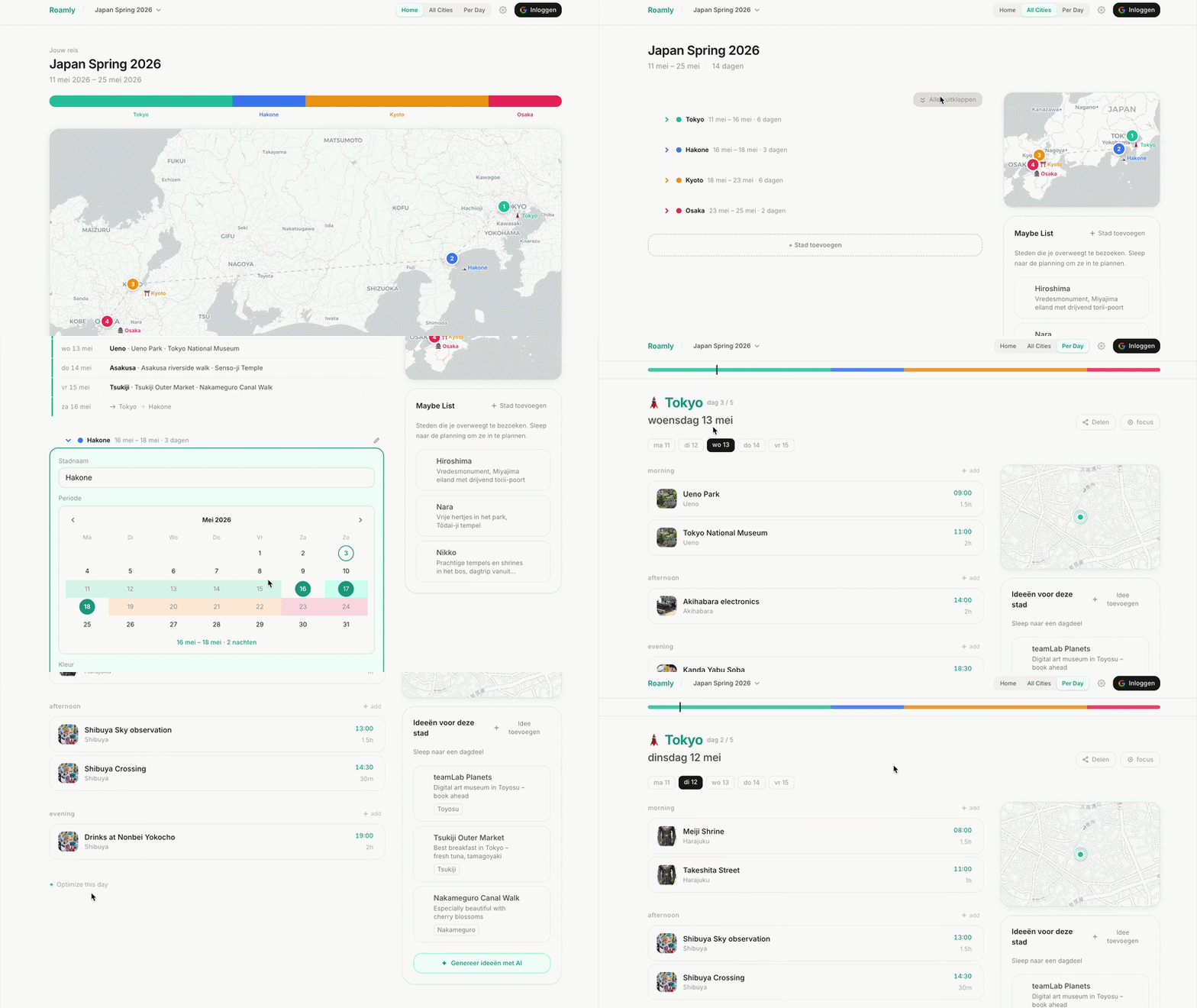
Roamly toont de reis als gekleurde segmenten op een tijdlijn — waarbij de verhouding de daadwerkelijke verblijfsduur weergeeft — én als interactieve kaart via Leaflet, met steden op échte geografische posities. Je ziet de route dus zowel in tijd als in ruimte.

Per dag kun je activiteiten invullen, en een ingebouwde AI-reisassistent — gekoppeld aan OpenAI — geeft per activiteit praktisch advies: openingstijden, hoe je er komt, wat je meeneemt, wat er in de buurt ligt.

Hier verscheen een nieuwe technologie: SvelteKit. Svelte werkt fundamenteel anders dan React — dichter op de browser, wat resulteert in lichtere, snellere code.

Parallel to PhraseKit, another question grew: how do you plan such a trip? Japan is large and demands many choices. You want to visit cities, but also know how many travel days that costs, how the order makes logical sense, and where the gaps in your planning are.

Roamly shows the trip as coloured segments on a timeline — where the proportions reflect actual duration — and as an interactive map via Leaflet, with cities at their actual geographic positions. You see the route in both time and space.

For each day you can fill in activities, and a built-in AI travel assistant — connected to OpenAI — gives practical advice per activity: opening times, how to get there, what to bring, what's nearby.

This introduced a new technology: SvelteKit. Svelte works fundamentally differently from React — closer to the browser, resulting in lighter, faster code.

SvelteKitTypeScriptFirestoreLeafletOpenAINetlify
Wat goed werkte What worked well

De combinatie van tijdlijn en kaart gaf een inzicht dat geen van beide alleen had kunnen bieden. Je ziet in één oogopslag of je reisroute geografisch logisch is — of dat je jezelf onnodig heen en weer laat reizen.

The combination of timeline and map gave insight that neither alone could have provided. At a glance you can see whether your travel route is geographically logical — or whether you're unnecessarily travelling back and forth.

Bekijk projectpagina View project page
Beloningssysteem · React · Firebase Reward System · React · Firebase

PowerUp

PowerUp beloningssysteem

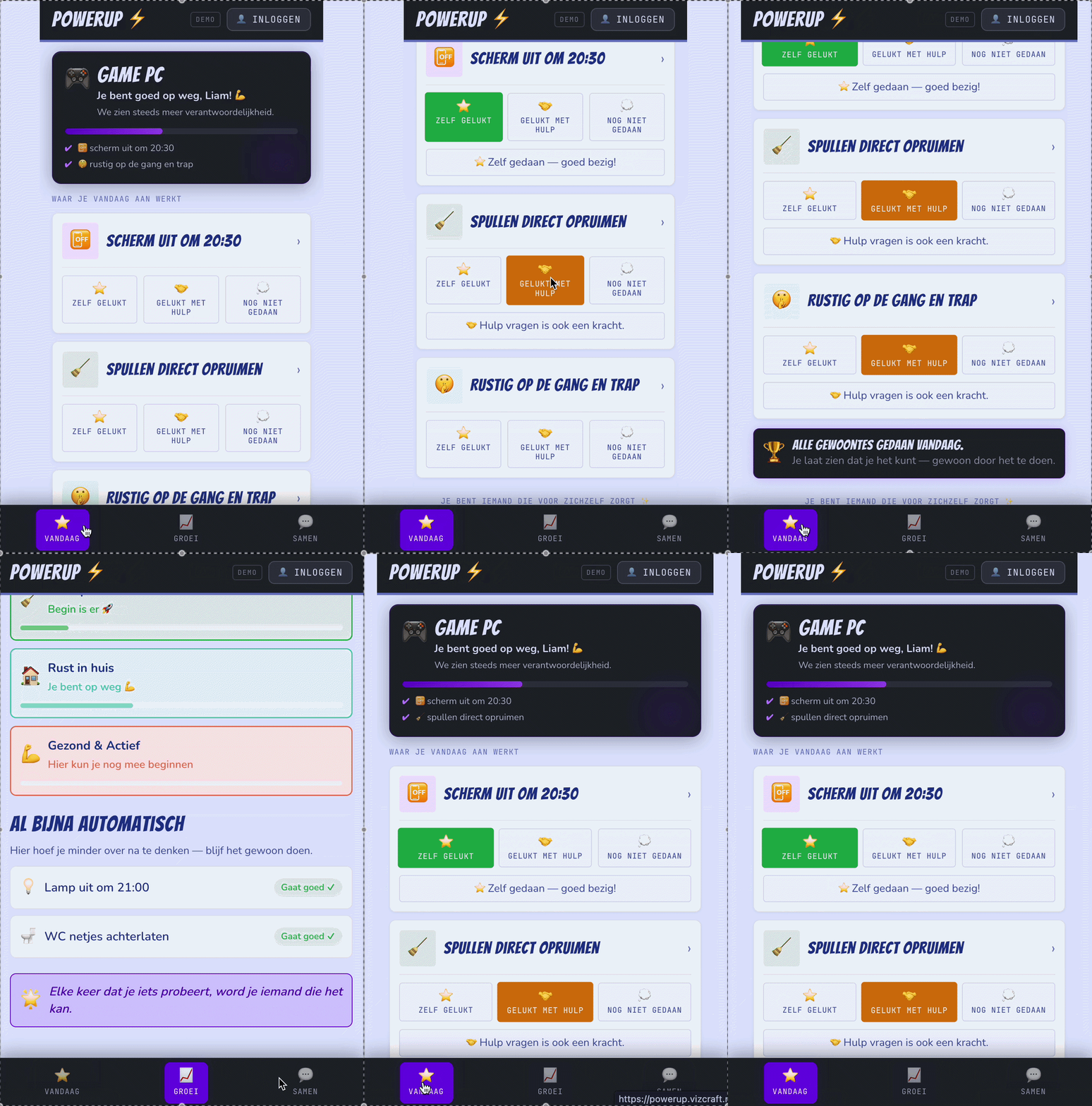
Het laatste project is ook het meest doordachte. Mijn zoon had een beloningssysteem nodig — niet een sticker op de koelkast, maar iets dat op zijn telefoon stond, bijhield welke gewoontes hij goed deed, hem feedback gaf op zijn groei, en ons samen een moment gaf aan het einde van de week om te reflecteren.

Voor dit project begon ik bij ChatGPT — voor het conceptuele en pedagogische denken. Welke gewoontes zijn zinvol om te belonen? Wat is de juiste beloningsfrequentie? Hoe voorkom je dat een beloningssysteem averechts werkt? Pas toen het concept stond stapte ik over naar Claude voor de bouw.

De routing is volledig uitgesplitst: het kind heeft eigen pagina's (vandaag, groei, samen-momenten), de ouder heeft eigen beheerpagina's voor gewoontes en beloningen. State wordt centraal beheerd via een Context, navigatie loopt via React Router.

The last project is also the most carefully considered. My son needed a reward system — not a sticker on the fridge, but something on his phone that tracked which habits he was doing well, gave him feedback on his growth, and gave us a shared moment at the end of the week to reflect.

For this project I started with ChatGPT — for the conceptual and pedagogical thinking. Which habits are worth rewarding? What is the right reward frequency? How do you prevent a reward system from backfiring? Only when the concept was set did I switch to Claude for the build.

The routing is fully split: the child has their own pages (today, growth, shared moments), the parent has their own management pages for habits and rewards. State is centrally managed via a Context, navigation runs via React Router.

ReactViteFirebaseContext APIReact Router
Wat goed werkte What worked well

De scheiding tussen kind- en ouderinterface is zowel technisch als pedagogisch de juiste keuze. En dit was het eerste project waarbij de inhoud uitgebreid was doordacht vóór de bouw begon — niet "wat wil ik bouwen" als eerste vraag, maar "wat wil ik bereiken".

The separation between child and parent interface is both technically and pedagogically the right choice. And this was the first project where the content was extensively thought through before the build began — not "what do I want to build" as the first question, but "what do I want to achieve".

Bekijk projectpagina View project page

Wat zes apps leren What six apps teach you

Als je terugkijkt op dit traject, zie je een beweging die misschien niet meteen opvalt wanneer je midden in het bouwen zit. Looking back at this trajectory, you notice a movement that may not be immediately obvious when you are in the middle of building.

01

Noodzaak & nieuwsgierigheid Necessity & curiosity

De vroege apps ontstonden uit noodzaak en nieuwsgierigheid — kan ik dit überhaupt? Glim was het bewijs dat het kon. The early apps arose from necessity and curiosity — can I even do this? Glim was proof that it was possible.

02

Eigen stem Own voice

Met Weekly Pulse verschoof het naar een echte creatieve vraag: wat wil ik uitdrukken? Experimenteren werd een eigen stem. With Weekly Pulse it shifted to a genuine creative question: what do I want to express? Experimenting became a voice of its own.

03

Bouwen voor anderen Building for others

Met PhraseKit, Roamly en PowerUp kwam de volgende laag: wat heeft iemand anders nodig, en hoe bouw ik daar iets goeds voor? With PhraseKit, Roamly and PowerUp came the next layer: what does someone else need, and how do I build something good for that?

De technologie volgde altijd op de behoefte en groeide mee. Van één HTML-bestand naar React, naar Next.js, naar SvelteKit. Van hardcoded data naar Google Sheets, naar Supabase, naar Firebase. Die progressie was niet gepland — het was het gevolg van steeds net iets verder willen gaan. The technology always followed the need and grew along with it. From a single HTML file to React, to Next.js, to SvelteKit. From hardcoded data to Google Sheets, to Supabase, to Firebase. That progression was not planned — it was the result of always wanting to go just a little further.

De code werd door Claude geschreven. De structuur, de keuzes in de stack, de patronen — die kwamen uit het bouwproces. Maar wat ik wilde bouwen, waarom, voor wie, en hoe het moest aanvoelen: dat was altijd het vertrekpunt. En door de code achteraf te bestuderen leerde ik meer over softwareontwikkeling dan in jaren van tutorials. The code was written by Claude. The structure, the choices in the stack, the patterns — those came from the build process. But what I wanted to build, why, for whom, and how it should feel: that was always the starting point. And by studying the code afterwards I learned more about software development than in years of tutorials.

AI als co-piloot werkt niet als je het het stuur laat overnemen.
Het werkt als je zelf weet waar je naartoe wilt.
AI as co-pilot does not work if you let it take the wheel.
It works when you know where you want to go.